7.2 Import / read in data
7.2.1 Load package into environment
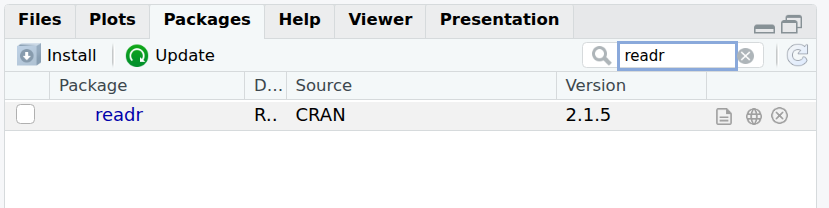
From RStudio interface, in the bottom-right panel and Packages tab, search for the package name and tick the box:
From the R console:
7.2.2 from CSV
Let’s now import the content of a first file in our environment.
There are several ways we can specify the path / location of a file:
- Using the “absolute path”:
# absolute path (assuming DataViz_R project/folder was created in the home directory)
geneexp <- read_csv(file="~/DataViz_R/GSE277039/DEG_counts_sample.csv")- Using the “relative path” (i.e. relative to where the session and R project are currently located: within the R project/directory), e.g.:
# relative path (this assumes you are in the course folder)
geneexp <- read_csv(file="GSE277039/DEG_counts_sample.csv")
Because your working directory is DataViz_R, R can find the GSE277039 subfolder without needing to specify the full path (relative vs absolute path).
The content of file DEG_counts_sample.csv is now stored in the object named geneexp.
The function also outputs some information about the data you are importing:

Such as that:
- The data contains 100 rows (observations), and 17 columns (variables).
- Out of these 17 columns:
- 2 contain characters (chr): GeneSymbol and DE.
- 15 contain numbers (dbl for “double”), including log2FoldChange, padj, WT1, WT2, etc.
Notes:
- Objects you create can be found in the Environment tab in the upper-right panel.
- If you click on an object name in the Environment tab, it will open on the upper-left panel. Let’s try with geneexp:
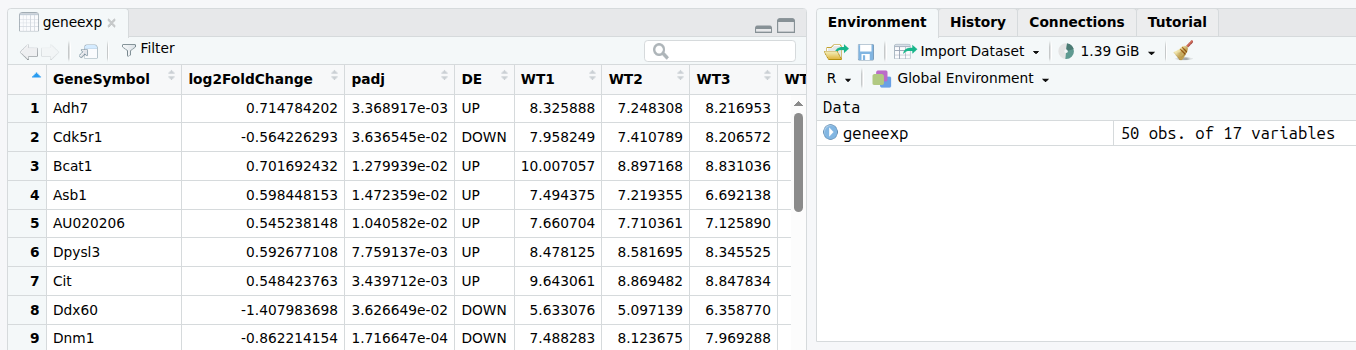
You can also check the first and last rows of the object with head()and tail() functions, respectively.
## # A tibble: 6 × 17
##   GeneSymbol log2FoldChange    padj DE      WT1   WT2   WT3   WT4   WT5   KO1   KO2   KO3   KO4
##   <chr>               <dbl>   <dbl> <chr> <dbl> <dbl> <dbl> <dbl> <dbl> <dbl> <dbl> <dbl> <dbl>
## 1 Adh7                0.715 0.00337 UP     8.33  7.25  8.22  7.44  7.87  8.88  8.78  8.74  8.54
## 2 Cdk5r1             -0.564 0.0364  DOWN   7.96  7.41  8.21  8.07  8.00  7.31  6.87  7.31  7.24
## 3 Bcat1               0.702 0.0128  UP    10.0   8.90  8.83  9.01  9.29 10.2  10.1  10.0  10.1
## 4 Asb1                0.598 0.0147  UP     7.49  7.22  6.69  7.60  6.93  7.71  7.50  8.24  7.81
## 5 AU020206            0.545 0.0104  UP     7.66  7.71  7.13  7.69  7.42  8.08  8.41  7.87  8.23
## 6 Dpysl3              0.593 0.00776 UP     8.48  8.58  8.35  9.46  8.59  9.06  9.22  9.41  9.59
## # ℹ 4 more variables: KO5 <dbl>, KO6 <dbl>, KO7 <dbl>, KO8 <dbl>## # A tibble: 6 × 17
## GeneSymbol log2FoldChange padj DE WT1 WT2 WT3 WT4 WT5 KO1 KO2 KO3 KO4
## <chr> <dbl> <dbl> <chr> <dbl> <dbl> <dbl> <dbl> <dbl> <dbl> <dbl> <dbl> <dbl>
## 1 Acp7 -0.631 0.123 NO 12.0 13.4 12.9 13.0 13.2 11.8 11.9 12.2 12.2
## 2 Acsl5 0.0428 0.723 NO 12.8 12.6 12.5 12.6 12.6 12.7 12.6 12.6 12.8
## 3 2700097O09Rik -0.0929 0.714 NO 8.83 8.78 9.18 9.04 8.81 8.65 8.78 9.07 8.56
## 4 A530017D24Rik -0.0466 0.911 NO 7.42 7.10 7.77 7.48 7.13 7.41 6.67 7.43 7.45
## 5 Abcg4 -0.283 0.393 NO 7.01 7.19 7.39 7.71 7.38 6.45 7.10 6.88 6.91
## 6 4933429H19Rik -0.142 0.768 NO 6.48 5.94 6.71 6.54 6.61 6.05 6.49 6.45 5.92
## # ℹ 4 more variables: KO5 <dbl>, KO6 <dbl>, KO7 <dbl>, KO8 <dbl>7.2.3 from Excel
7.2.3.1 readxl package
{tidyverse} provides the {readxl} package with functions to read in Excel files.
Although working with text files (.txt, .csv, .tsv etc.) is a better practice, you can import Excel files using the read_excel() function.
First, load the {readxl} package (bottom-right panel -> Packages -> search and tick readxl, or from the console, as shown below).
If your Excel file contains multiple sheets, you can specify the sheet name using the sheet= parameter:
Note: parameters in a function are comma-separated:
- path is a first parameter
- sheet is a second parameter